Posts

Showing posts from September, 2020

Protection Mechanism in 802.11n
Image
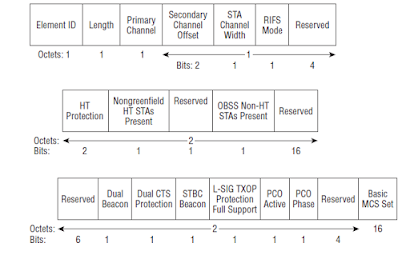
References: https://www.cwnp.com/802-11n-protection-mechanisms-part-2/ https://mrncciew.com/2014/11/04/cwap-ht-operations-ie/ 802.11n survival guide - Mathew Gast When ever a new wireless standard is introduced, the new devices' transmissions cannot be decoded by the older devices. When 802.11g came into existence, the OFDM transmissions by 802.11g devices cannot be decoded by the older 802.11b /802.11devices.  Hence in order to protect the newer 802.11g devices from older 802.11b devices,  protection mechanisms were introduced in 802.11g 's standard. In a ERP BSS where 802.11/802.11b coexist, protection mechanism has to be enabled.  This is indicated by setting the bits ' Use Protection ' and 'non Erp Present ' bits in the ERP information element of the beacon. ERP stations know that they need to use the protection frames prior to sending OFDM frames based on this. In the case of 802.11n, HT transmissions needs to be protected if there  are older stations ( b/a...

Protection Mechansims in 802.11g

Need for Protection  In a WLan BSS with both 802.11b and 802.11g devices,  the AP ( 802.11g)  has to serve both 802.11g and 802.11b clients. Due the difference in chipset implementations of 802.11b and 802.11g devices, a 802.11b device cannot decode  high rate  transmissions from a 802.11g device.  Unaware of a 802.11g device's transmission, if a 802.11b client transmits at the same time, it will cause interference to 802.11g's transmission.  So 802.11g specifies certain protection mechanisms to ensure that 802.11g's transmissions are not interrupted by the legacy devices. These protection mechanisms  are there to make sure that the legacy devices are  aware when a 802.11g device is transmitting so that , legacy devices can defer their transmission. Types of Protection Mechanisms in 802.11g 802.11g specifies two types of protection mechanism.  1) cts-to-self protection mechanism: In this , when ever a 802.11g station has a ofdm data fram...

Dynamic Frequency Selection in Wireless Networks

Image
References https://www.cwnp.com/dynamic-frequency-selection/ Note: All figures taken from internet  Dynamic Frequency Selection In US and some other countries s ome of the Unlicensed National Information Infrastructure (U-NII) bands, 5.25-5.35 Ghz ( UNII -2) are used by radar systems. When wifi devices operate in these bands , they should not cause interference to the radar systems. Wlan devices operating in these bands or frequencies need to check periodically for the presence of any radar signals. If the device finds any radar signal, then it should not cause interference to the radar systems. The entire BSS must switch to a new channel. This process of detecting the radar signals and switching to a different channel is Dynamic frequency selection. DFS process consists of the following steps 1) Quieting the Channel: In an Infra structure network, the Ap schedules certain periods to be quiet periods where all the stations stop any transmiss...

Power Management and Conservation in Wireless Networks

Image
Unicast frame buffer and DTIM Mobile Devices run on battery.  It is essential to conserve the battery power , to avoid frequent recharging of batteries and to have continued network connectivity.  The best  way to conserve power in wireless network is to turn off the transceiver. When the transceiver is turned off , it is said to be in sleep state or Doze state. When the transceiver is on, the mobile station is said to be in active state. By keeping a mobile station in sleeping state for a longer period of time , power can be conserved. To conserve power , stations go to sleeping mode also called power save mode. Station indicates to the AP that it is going to power save mode by sending a NULL data frame to the AP. This is a special kind of frame that has no frame body.  This  frame has only a MAC Header and FCS field.This frame can only be sent by a station to the AP. The power Management bit in the frame control field can be set to 1 or 0. Whe...